Best AI Product Photography Tools for Eyewear, Sunglasses and Glasses (2026): Photoroom vs Photta
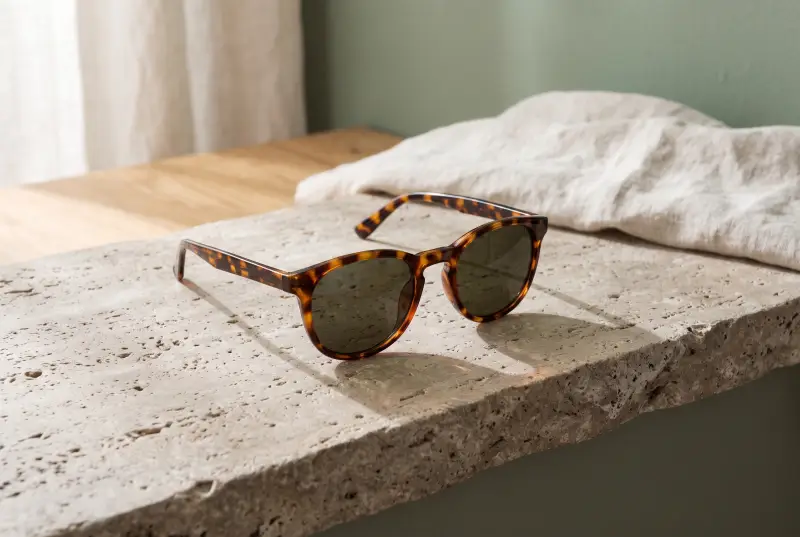
Contents
The best AI tool for eyewear product photos depends on whether the frame should appear alone or on a face. To keep your own photo of a frame on exact white, Photoroom is a general editor from $12.99 a month; its pages do not name eyewear. For product-only shots of glasses and sunglasses, Photta’s eyewear product photography costs about $0.16 to $0.25 a photo, and its Eyewear Studio puts the frame on an AI face model for about $0.21 to $0.32. For on-face pictures, look at Rawshot, Veeton and Modelia, and at Apiway Studio, which places the frame on a real photograph of a face. Photoroom’s and Photta’s pages were read on 18 November 2026, every other vendor’s on 15 November 2026.
This list was built from each vendor’s own eyewear, guide and pricing pages: Photoroom’s and Photta’s were read again on 18 November 2026, every other vendor’s on 15 November 2026. The order is not a score, and every entry is held to the same rule: only what the vendor’s own pages state.
Key takeaways
- An on-face picture previews style; it is not a fitting. Photta’s Eyewear Studio page says this of its own On-Model mode, and the caution suits every on-face tool here.
- The frame on the face is the generated part. Apiway’s guide says the face stays exact and only the frame is new, and Veeton’s FAQ calls its photos fully AI-generated.
- Small markings need a second look. Nightjar’s eyewear guide warns that logos, lens etching and fine engraved text need caution, and Caspa AI warns on its perfume page that coloured light in a scene can tint clear glass.
- Free starts are small and often marked. Photta’s free photos carry a watermark until a first purchase, Modelia’s free plan gives 50 welcome credits with the Modelia watermark, and Rawshot has a 7-day trial with 50 credits.
Photoroom vs Photta for eyewear product photos
| Tool | Best for | On a face or product only? | Starts from | Free start |
|---|---|---|---|---|
| Photoroom | Batches of frames on exact white | Product only; eyewear not named | $12.99 a month | Free start; trial |
| Photta | Product-only shots plus on-face previews | Both: Product Only and On-Model | $19 a month | First photos free, watermarked |
| Rawshot | Directed on-face shots of sunglasses | On a face | $9 a month | 7-day trial, 50 credits |
| Veeton | Glasses worn by a chosen model | On a face | $12.99 a month | 7-day trial, 100 credits |
| Modelia | On-model shots from one photo and a prompt | On a face | $30 a month | 50 credits, watermarked |
| Apiway Studio | Frames on real model photographs | Both; frame-only on pure white | $19.99 a month | 100 one-time credits |
| PixelPanda | Many low-cost shots of each frame | Both | $7 a month | Free start, amount not stated |
| Nightjar | One look across a whole frame range | Both, per its eyewear guide | $25 a month | 6 free credits |
| Caspa AI | A frame kept as you shot it | Product only; eyewear not named | $59 a month | No free plan |
| Product Shoot | A white main image from a phone photo | Product only; eyewear not named | $15 a month | 4 free credits |
Eyewear product photos on a face are a preview, not a fitting
The product-only shot shows the frame by itself: front, three-quarter and folded, on white or a quiet surface. It tells the shopper what they are buying: the shape, the colour, the lens tint, the logo on the temple.
The on-face shot shows a person wearing the frame. It shows how the style looks, and it is nearly always generated: the tool draws the frame onto a model’s face, or onto a real photograph of one. It cannot tell a shopper whether the pair will fit their own face.
So write the measurements in the listing, keep at least one product-only shot for each colour, and use on-face shots as the second or third image. The same holds for watch product photos shown on a wrist.
The 10 best AI tools for eyewear product photos
1. Photoroom: batch-edited eyewear product photos in a general photo editor
Photoroom is a product photo editor on the web, iOS and Android, with a Shopify app. It removes backgrounds, adds exact-white or AI backgrounds and runs its AI tools on whole batches of images. Its pages do not mention eyewear, so it is listed as a general tool.
- On a face or product only?: Product only, for this purpose. Its White Background page says only the background is swapped; its staging tools are generative.
- Price: Pro is $12.99 a month, or $89.99 a year ($7.50 a month), with 8,000 AI credits and 1,000 exports a month; Max is $34.99 a month and Ultra $99 a month, with 25,000 and 75,000 AI credits.
- Free start: Its pages say you can get started for free, and the pricing page offers a free trial whose length is not stated.
- Not for: Glasses on a face, which its pages do not describe.
2. Photta: studio eyewear product photos, with an on-face mode
Photta is an AI product photography studio that runs in the browser. Its eyewear product photography tool takes a photo of glasses or sunglasses and returns product-only shots on white, a gradient or marble, as a lifestyle scene or as a flat lay. A separate Eyewear Studio has two modes: Product Only, and On-Model, which shows the frame on an AI face model. Its page says the on-face picture is a preview of style, not a fitting. Photos come at 2K on every account and at 4K on the Seller and Brand plans.
- On a face or product only?: Both. In either mode Photta redraws the frame from your photo instead of pasting in the original pixels, so compare the shape, colour, lens tint and temple logo with the real pair.
- Price: Product-only shots are about $0.16 to $0.25 a photo and on-face shots about $0.21 to $0.32 a photo at 2K, on monthly plans from $19 a month. Without a plan, one-time packs of $12 or $20 never expire.
- Free start: A new account can make five product photos or four on-face photos at 2K free with no card; those photos carry a watermark until a first purchase.
- Not for: A try-on widget for shoppers, or proof of fit: the on-face picture previews style only.
3. Rawshot: on-model eyewear product photos in eyes, head and bust frames
Rawshot is a configurator-style AI photo studio with an eyewear section. You import a product photo, flat lay, mockup or sketch, then pick the model, body frame, pose, light and background. It shows sunglasses and optical frames on a model’s face in eyes, head and bust frames, at 2K or 4K.
- On a face or product only?: On a face. Its page says to start from the real item and keep product fidelity while the scene is built; it says nothing specific about logos or lenses.
- Price: Starter is $9 a month for 80 credits, enough for 16 images, which its pricing page states as $0.56 an image; Business is $179 a month at $0.45 an image.
- Free start: A 7-day free trial with 50 credits, enough for 10 images; a watermark on trial images is not stated.
- Not for: Plain product-only frame shots, which the eyewear page read does not cover; its output is also AI-labelled.
4. Veeton: on-model eyewear product photos from a packshot
Veeton is an AI fashion photoshoot tool that turns a packshot into on-model photos. Its glasses solution covers sunglasses and optical frames and describes itself as a generator of on-model visuals for eyewear brands. Photos come with a commercial license; a maximum resolution is not stated.
- On a face or product only?: On a face. Its FAQ says the photos are fully AI-generated, so the frame is drawn again; nothing is stated about logos.
- Price: Pro 100 is $12.99 a month for 100 credits, which is 10 on-model images, about $1.30 an image; Pro 2000 is $199.99 a month, about $1.00 an image.
- Free start: A 7-day free trial with 100 free credits, about 10 photos, and no credit card; watermark-free exports are listed as a Pro feature.
- Not for: Product-only shots, or shops that need many images at about $1.00 to $1.30 each.
5. Modelia: prompt-based eyewear product photos on a model
Modelia is an AI fashion imagery platform. Its Glasses on Model tool takes one image of sunglasses or optical glasses and a text description of the result, and generates pictures of a model wearing them. The page asks the user to describe the glasses and select their size.
- On a face or product only?: On a face. How closely the generated frame matches the uploaded one is not stated; its home page claims accurate face alignment.
- Price: Creator is $30 a month for 150 credits, with 4K output; Atelier is $109 a month. The number of credits one image uses is not stated.
- Free start: A free Starter plan gives 50 welcome credits, then 20 a month, at up to 2K with the Modelia watermark.
- Not for: Sellers who need a known cost per image, or a product-only frame shot, which the page read does not cover.
6. Apiway Studio: eyewear product photos on real photographs of faces
Apiway Studio is built around a marketplace of real photo sets shot by creators. You upload the eyewear product and the AI dresses the frame onto an existing photograph of a model’s face. A White Studio template re-lights frame-only shots onto pure white.
- On a face or product only?: Both. On a face, its guide says “The face stays exact. Only the frame is new”, so the frame is the part to check.
- Price: Starter is $19.99 a month for 2K shared credits, and extra credits cost $0.01 each. Its guide says 150 credits is enough for a complete four-shot eyewear pack.
- Free start: A free tier with one-time credits: 100 on the pricing page, 150 in the body of its guide.
- Not for: Looks outside its creator marketplace: on-face shots are limited to the photo sets available there.
7. PixelPanda: low-cost eyewear product photos, alone or on a model
PixelPanda is an AI product photo and ad tool with a category page for eyewear and sunglasses. It makes white-background shots and scenes from templates, and its eyewear page says it generates front-facing on-model shots that mimic virtual try-on displays. Each generated product photo costs 1 credit.
- On a face or product only?: Both. Whether the frame is kept or redrawn is not stated, and its pages do not say what happens to logos.
- Price: Lite is $7 a month for 100 credits, about $0.07 a photo; Starter is $24 a month for 1,125 credits, about $0.02 a photo.
- Free start: A free start is advertised on its watch page; the same offer for eyewear, and the number of free credits, are not stated.
- Not for: Sellers who want a written statement on frame accuracy before buying, since its pages do not give one.
8. Nightjar: consistent eyewear product photos from a saved Product
Nightjar saves each frame as a reusable Product with several reference photos and its dimensions, then shoots packshots, lifestyle or on-model images. Its eyewear guide names listing images, lifestyle scenes and on-model visuals.
- On a face or product only?: Both. Its guide warns that logos, lens etching and fine engraved text need caution, so compare them with the real pair.
- Price: Studio is $25 a month for 150 credits, about $0.17 an image at 1K or 2K; Studio+ is $50 a month for 400 credits, $0.125 an image.
- Free start: 6 free credits with no credit card, enough for 6 product photos; a watermark is not stated.
- Not for: Sellers who want an eyewear tool with its own product page; the evidence here is a blog guide.
9. Caspa AI: scenes built around your own eyewear product photos
Caspa AI is a general product photo tool: you upload one product photo and choose a white background, a model or a template scene, or type a prompt. Its category pages cover beauty, perfume, bags and shoes and do not name eyewear, so it is listed here for product-only shots of a frame.
- On a face or product only?: Product only, for this purpose. Its pages say the product is kept as it appears in the uploaded photo and the scene is built around it.
- Price: Starter is $59 a month, or $39 a month billed yearly, for 500 credits and images only. The number of credits one image uses is not stated.
- Free start: There is no free plan: a card is needed when you choose a plan, with a 30-day money-back guarantee.
- Not for: Glasses on a face, which its pages do not describe, and sellers who want to try before paying.
10. Product Shoot: white main images and backdrops for eyewear product photos
Product Shoot is a browser Studio that turns a phone photo of a product into a white main image, then into backdrop scenes with Backdrop Swap, and resizes the result for marketplaces. Its category pages cover cosmetics, skincare, perfume and bags and do not name glasses or sunglasses, so it is a general option here.
- On a face or product only?: Product only, for this purpose. Its pages say the product stays identical in every render while the setting is built around it; frames and lenses are not mentioned.
- Price: Starter is $15 a month for 1,000 credits, about 250 Standard images at $0.06 each.
- Free start: 4 free credits to open the Studio, enough for one Standard image, with no card.
- Not for: On-face shots of frames: it has a Product on Model tool, but its pages do not describe glasses on a face.
How to check eyewear product photos before you publish
Put the real pair next to the screen and look at each picture at full size.
- Frame shape: the same lens outline, bridge and rim thickness as the real pair.
- Colour and finish: matte or gloss, the pattern of the acetate, the tone of the metal.
- Lenses: the right tint, gradient or mirror coating, on sunglasses above all.
- Logo and markings: the temple logo, model code and lens etching, spelled and placed correctly.
- On-face shots: temples that reach the ears and a frame that sits level.
- Listing text: lens width, bridge and temple length written out, because a picture is not a fitting.
Which AI tool for eyewear product photos fits your shop
- You want your own photo of the frame kept and only the setting changed: use Photoroom, Caspa AI or Product Shoot.
- You need product-only shots of glasses or sunglasses from one photo: use Photta or PixelPanda.
- You need the frame shown on a model’s face: use Rawshot, Veeton or Modelia.
- You want the frame on a real photograph of a person: use Apiway Studio.
- You need one look repeated across a large range of frames and colours: use Nightjar.
FAQ: AI tools for eyewear product photos
What are the best AI product photography tools for eyewear, sunglasses and glasses?
It depends on the shot. To keep your own photo of a frame on exact white, Photoroom is a general editor; for product-only shots of glasses and sunglasses, Photta’s eyewear product photography costs about $0.16 to $0.25 a photo and has an on-face mode at about $0.21 to $0.32; for on-model pictures alone, Rawshot, Veeton and Modelia are built for that job.
Can AI show eyewear product photos on a face?
Yes. Photta’s Eyewear Studio, Rawshot, Veeton, Modelia and PixelPanda generate a model wearing the frame, and Apiway Studio places the frame on a real photograph of a face. The frame on the face is generated, as with handbag product photos carried by a model, so compare it with the real pair.
Are on-face eyewear product photos the same as a virtual try-on?
No. The tools in this list make listing pictures of a model wearing the frame for the seller; a virtual try-on is a widget that shows the frame on the shopper’s own face. Photta’s Eyewear Studio page says its on-face picture is a preview of style, not a fitting, so write the frame measurements in the listing.
Do AI tools for eyewear product photos work with sunglasses?
Yes. Photta, Rawshot, Veeton and Modelia all name sunglasses on their pages. Check the lens tint against the real pair; Nightjar’s eyewear guide warns that lens etching and logos need caution.
How much do AI eyewear product photos cost?
From about $0.02 to about $1.30 an image on the plans read. Photta works out at about $0.16 to $0.25 for product-only shots and about $0.21 to $0.32 on a face, PixelPanda at about $0.02 to $0.07, Product Shoot at about $0.06, Rawshot states $0.45 to $0.56 and Veeton comes to about $1.00 to $1.30.
Can I make eyewear product photos with AI for free?
Yes, a few. Photta gives a new account enough for five product photos or four on-face photos, with a watermark until a first purchase; Modelia’s free plan gives 50 welcome credits with its watermark, Nightjar gives 6 free credits and Rawshot has a 7-day trial. Caspa AI has no free plan.
Sources for this comparison of eyewear product photos tools
- Read on 18 November 2026: Photoroom, Photta, each on its own product, help and pricing pages (for Photta, its pricing page, llms.txt and tool pages).
- Read on 15 November 2026: Rawshot, Veeton, Modelia, Apiway Studio, PixelPanda, Nightjar, Caspa AI, Product Shoot, each on its own product, help and pricing pages.
- Cost per image is our own arithmetic from the listed plan prices, except where a vendor states it. Where a page does not state something, this comparison says “not stated”.
- The addresses of every page read are kept in this site’s source record for this post, so the facts can be refreshed.
The software in this comparison
Each profile shows what our other comparisons found about the same tool, and its closest alternatives.
Head-to-head for tools in this comparison
Related comparisons
-
Best AI Product Photography Tools for Watches (2026): Photoroom vs Photta vs Flair vs Pebblely
-
Best AI Product Photography Tools for Jewelry (2026): Photoroom vs Photta vs Pebblely vs Flair
-
Best AI Product Photography Tools for Macro Close-Up Product Detail Images (2026): Photoroom vs Photta vs Flair
Corrections
Prices and features change. If something in this post is out of date, write to support@descriptra.com and we will check it against the vendor’s page and correct it.